WinTranslator
 Capture software design from source code with WinTranslator. Generate class models, structure charts or data models from existing code with minimal human effort.
Class Models
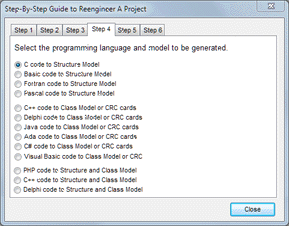
WinTranslator scans code files and outputs design information to a text file. That data can be imported into WinA&D. The automated process is driven be a script produced when a designer selects the programming language and project options from step-by-step dialog.
Object-oriented software written in Visual Basic, C++, C#, Java, Delphi, Xojo or PHP creates WinA&D class models. Diagram objects click to source code.
Structure Charts
Code written in C, Pascal, procedural Basic, Fortran or PHP generates structure charts. Diagrams can be automatically organized into multiple diagram levels to easily accommodate very large software systems.
Detailed information can be extracted from the code including data types, parameter lists and descriptive comments. There are many options available to support different language dialects and customize the output produced.
Data Models
WinTranslator makes it easy to generate data models from an SQL script for popular RDBMS products including Oracle, DB2, SQL Server, Sybase, Informix and InterBase. It produces a dictionary entry list from the SQL that can be imported into WinA&D. Logical and physical data models can then be generated from the Dictionary.
UML from Ada
WinTranslator generates UML class models from Ada code. Captures Ada package information, relationships between packages and package components like records, arrays and other type definitions, variables, constants, named numbers, exceptions and subprograms. Details captured for subprograms include return data types and argument lists. Generic package parameters and actual parameters of generic instantiations are also captured. The public, private and implementation scope of each package component is shown in generated UML class models.
Automated Reengineering
WinTranslator commands can be issued interactively, from a text script or through a programming interface. The Reengineer Project dialog steps the user through the reengineering process of object-oriented or procedural-oriented projects with a series of screens. Large projects with thousands of code files and folders can be processed in minutes.
Try It On Your Project
The WinTranslator Demo & Manual package can be used with WinA&D to experience the reengineering capabilities on your project code. Demonstration videos and examples show how to generate structure charts, class diagrams or data models from source code in minutes.
System Requirements

 WinTranslator runs on Windows 8.1 to 11. Single User, 5-User Site and Unlimited User Site Licenses are available.
WinTranslator Network is a subscription that runs on Windows Server or cloud service like Azure or AWS. It allows multiple concurrent users from macOS or Windows computers.
See what's new in WinTranslator 4.2.