Protect and License
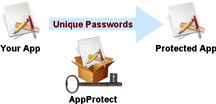 With AppProtect, anyone can click to protect a compiled application. The protected Mac or Windows application must be activated to run on the customer computer.
Use AppProtect alone for a manual activation process where you provide a unique password to each computer. Combine AppProtect with Safe Activation, Desktop License Server or WebActivation for online Serial Number activation. You control how many unique computers can be activated with each Serial Number.
 AppProtect on Windows can generate 32 or 64-bit applications. AppProtect on Mac can generate 64-bit Intel, 64-bit ARM or Universal applications that run native on Intel or Apple Silicon computers.
Apply your Code Sign certificate, check or remove a code signature from your application with AppProtect.

-
To build a protected application, open the AppProtect window, select the desired options and click the Build button. The application is wrapped with an activation process that presents a dialog on first launch.
Once activated, protected software will run on that computer without user interaction. An App must be uniquely activated on each computer.
The vendor can choose an activation process that either presents an Enter Password or Enter Serial Number dialog.
-
The Enter Password dialog shows a computer specific password number and requires a unique password from the vendor. The dialog may optionally include a link to the vendor's web site presented by the default web browser on that computer.
Enter Serial Number
The activation process is then fully automated through a silent connection with the Safe Activation service or Desktop License Server or WebActivation running on your own website.
-
Add time restrictions to a license. The license can expired on a specific date or time period after activation.
Sell software based on a time period or offer a Trial license.
An expired license can be securely extended with a code provided from AppProtect or an online Safe Activation Service 3 account.
Daily Reset Code
-
Generate a Reset Code from AppProtect or an online Safe Activation Service 3 account. The Reset Code works on any computer and expires after one day. It provides a convenient way to reset a customer Trial license or an activated application on a development computer.
-
Paste VBA Code into your macro enabled Excel workbook using OfficeProtect, then wrap it into a single workbook application with AppProtect. The user needs 32 or 64-bit Windows Excel or Mac Excel 2016+.
-
Save your Access application as a 32 or 64-bit ACCDE file, then wrap it into a protected EXE with AppProtect. The user requires Access installed on their Windows computer to run your application.
-
Save your ExcelRT project as an encrypted ERT file, then wrap it into an EXE for Windows or APP for macOS. Install the ExcelRT runtime with your application for a standalone product.
-
AppProtect can be used to protect a standard macOS application (.app) or Windows executable (.exe). In addition to providing piracy protection, the vendor can apply a high-resolution icon to the application and enter parameters to configure the activation process.
AppProtect can embed static data files into the application file. Use AppProtect to secure a MAX application, Unity game or Adobe Air. AppProtect offers additional optional protection layers that can be enabled for specific applications.
-
If your product requires more license types (Try/Buy or Monthly/Annual Subscription) or advanced options (move license between computers), see QuickLicense. With QuickLicense, your Excel, Access or ExcelRT based application can use a customized Open Data File interface window to enhance the user experience.
 AppProtect MacOS is a Universal app that runs native on macOS 10.14 or later with an Intel or Apple Silicon processor.